Showing posts with label Unicode. Show all posts

Friday, November 25, 2011

The Absolute Minimum Every Software Developer Absolutely, Positively Must Know About Unicode and Character Sets (No Excuses!)

The Absolute Minimum Every Software Developer Absolutely, Positively Must Know About Unicode and Character Sets (No Excuses!)

by Joel Spolsky
Wednesday, October 08, 2003
Ever wonder about that mysterious Content-Type tag? You know, the one you're supposed to put in HTML and you never quite know what it should be?
Did you ever get an email from your friends in Bulgaria with the subject line "???? ?????? ??? ????"?
I've been dismayed to discover just how many software developers aren't really completely up to speed on the mysterious world of character sets, encodings, Unicode, all that stuff. A couple of years ago, a beta tester for FogBUGZ was wondering whether it could handle incoming email in Japanese. Japanese? They have email in Japanese? I had no idea. When I looked closely at the commercial ActiveX control we were using to parse MIME email messages, we discovered it was doing exactly the wrong thing with character sets, so we actually had to write heroic code to undo the wrong conversion it had done and redo it correctly. When I looked into another commercial library, it, too, had a completely broken character code implementation. I corresponded with the developer of that package and he sort of thought they "couldn't do anything about it." Like many programmers, he just wished it would all blow over somehow.
But it won't. When I discovered that the popular web development tool PHP has almost complete ignorance of character encoding issues, blithely using 8 bits for characters, making it darn near impossible to develop good international web applications, I thought, enough is enough.
So I have an announcement to make: if you are a programmer working in 2003 and you don't know the basics of characters, character sets, encodings, and Unicode, and I catch you, I'm going to punish you by making you peel onions for 6 months in a submarine. I swear I will.
And one more thing:
IT'S NOT THAT HARD.
In this article I'll fill you in on exactly what every working programmer should know. All that stuff about "plain text = ascii = characters are 8 bits" is not only wrong, it's hopelessly wrong, and if you're still programming that way, you're not much better than a medical doctor who doesn't believe in germs. Please do not write another line of code until you finish reading this article.
Before I get started, I should warn you that if you are one of those rare people who knows about internationalization, you are going to find my entire discussion a little bit oversimplified. I'm really just trying to set a minimum bar here so that everyone can understand what's going on and can write code that has a hope of working with text in any language other than the subset of English that doesn't include words with accents. And I should warn you that character handling is only a tiny portion of what it takes to create software that works internationally, but I can only write about one thing at a time so today it's character sets.
A Historical Perspective
The easiest way to understand this stuff is to go chronologically.
You probably think I'm going to talk about very old character sets like EBCDIC here. Well, I won't. EBCDIC is not relevant to your life. We don't have to go that far back in time.
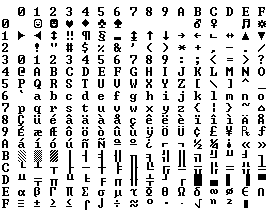
ASCII tableBack in the semi-olden days, when Unix was being invented and K&R were writing The C Programming Language, everything was very simple. EBCDIC was on its way out. The only characters that mattered were good old unaccented English letters, and we had a code for them called ASCIIwhich was able to represent every character using a number between 32 and 127. Space was 32, the letter "A" was 65, etc. This could conveniently be stored in 7 bits. Most computers in those days were using 8-bit bytes, so not only could you store every possible ASCII character, but you had a whole bit to spare, which, if you were wicked, you could use for your own devious purposes: the dim bulbs at WordStar actually turned on the high bit to indicate the last letter in a word, condemning WordStar to English text only. Codes below 32 were called unprintable and were used for cussing. Just kidding. They were used for control characters, like 7 which made your computer beep and 12 which caused the current page of paper to go flying out of the printer and a new one to be fed in.
And all was good, assuming you were an English speaker.
Because bytes have room for up to eight bits, lots of people got to thinking, "gosh, we can use the codes 128-255 for our own purposes." The trouble was, lots of people had this idea at the same time, and they had their own ideas of what should go where in the space from 128 to 255. The IBM-PC had something that came to be known as the OEM character set which provided some accented characters for European languages and a bunch of line drawing characters... horizontal bars, vertical bars, horizontal bars with little dingle-dangles dangling off the right side, etc., and you could use these line drawing characters to make spiffy boxes and lines on the screen, which you can still see running on the 8088 computer at your dry cleaners'. In fact  as soon as people started buying PCs outside of America all kinds of different OEM character sets were dreamed up, which all used the top 128 characters for their own purposes. For example on some PCs the character code 130 would display as é, but on computers sold in Israel it was the Hebrew letter Gimel (ג), so when Americans would send their résumés to Israel they would arrive asrגsumגs. In many cases, such as Russian, there were lots of different ideas of what to do with the upper-128 characters, so you couldn't even reliably interchange Russian documents.
Eventually this OEM free-for-all got codified in the ANSI standard. In the ANSI standard, everybody agreed on what to do below 128, which was pretty much the same as ASCII, but there were lots of different ways to handle the characters from 128 and on up, depending on where you lived. These different systems were called code pages. So for example in Israel DOS used a code page called 862, while Greek users used 737. They were the same below 128 but different from 128 up, where all the funny letters resided. The national versions of MS-DOS had dozens of these code pages, handling everything from English to Icelandic and they even had a few "multilingual" code pages that could do Esperanto and Galician on the same computer! Wow! But getting, say, Hebrew and Greek on the same computer was a complete impossibility unless you wrote your own custom program that displayed everything using bitmapped graphics, because Hebrew and Greek required different code pages with different interpretations of the high numbers.
Meanwhile, in Asia, even more crazy things were going on to take into account the fact that Asian alphabets have thousands of letters, which were never going to fit into 8 bits. This was usually solved by the messy system called DBCS, the "double byte character set" in whichsome letters were stored in one byte and others took two. It was easy to move forward in a string, but dang near impossible to move backwards. Programmers were encouraged not to use s++ and s-- to move backwards and forwards, but instead to call functions such as Windows' AnsiNext and AnsiPrev which knew how to deal with the whole mess.
But still, most people just pretended that a byte was a character and a character was 8 bits and as long as you never moved a string from one computer to another, or spoke more than one language, it would sort of always work. But of course, as soon as the Internet happened, it became quite commonplace to move strings from one computer to another, and the whole mess came tumbling down. Luckily, Unicode had been invented.
Unicode
Unicode was a brave effort to create a single character set that included every reasonable writing system on the planet and some make-believe ones like Klingon, too. Some people are under the misconception that Unicode is simply a 16-bit code where each character takes 16 bits and therefore there are 65,536 possible characters. This is not, actually, correct. It is the single most common myth about Unicode, so if you thought that, don't feel bad.
In fact, Unicode has a different way of thinking about characters, and you have to understand the Unicode way of thinking of things or nothing will make sense.
Until now, we've assumed that a letter maps to some bits which you can store on disk or in memory:
A -> 0100 0001
In Unicode, a letter maps to something called a code point which is still just a theoretical concept. How that code point is represented in memory or on disk is a whole nuther story.
In Unicode, the letter A is a platonic ideal. It's just floating in heaven:
A
This platonic A is different than B, and different from a, but the same as A and A and A. The idea that A in a Times New Roman font is the same character as the A in a Helvetica font, but different from "a" in lower case, does not seem very controversial, but in some languages just figuring out what a letter is can cause controversy. Is the German letter ß a real letter or just a fancy way of writing ss? If a letter's shape changes at the end of the word, is that a different letter? Hebrew says yes, Arabic says no. Anyway, the smart people at the Unicode consortium have been figuring this out for the last decade or so, accompanied by a great deal of highly political debate, and you don't have to worry about it. They've figured it all out already.
Every platonic letter in every alphabet is assigned a magic number by the Unicode consortium which is written like this: U+0639.  This magic number is called a code point. The U+ means "Unicode" and the numbers are hexadecimal. U+0639 is the Arabic letter Ain. The English letter A would be U+0041. You can find them all using thecharmap utility on Windows 2000/XP or visiting the Unicode web site.
There is no real limit on the number of letters that Unicode can define and in fact they have gone beyond 65,536 so not every unicode letter can really be squeezed into two bytes, but that was a myth anyway.
OK, so say we have a string:
Hello
which, in Unicode, corresponds to these five code points:
U+0048 U+0065 U+006C U+006C U+006F.
Just a bunch of code points. Numbers, really. We haven't yet said anything about how to store this in memory or represent it in an email message.
Encodings
That's where encodings come in.
The earliest idea for Unicode encoding, which led to the myth about the two bytes, was, hey, let's just store those numbers in two bytes each. So Hello becomes
00 48 00 65 00 6C 00 6C 00 6F
Right? Not so fast! Couldn't it also be:
48 00 65 00 6C 00 6C 00 6F 00 ?
Well, technically, yes, I do believe it could, and, in fact, early implementors wanted to be able to store their Unicode code points in high-endian or low-endian mode, whichever their particular CPU was fastest at, and lo, it was evening and it was morning and there were already two ways to store Unicode. So the people were forced to come up with the bizarre convention of storing a FE FF at the beginning of every Unicode string; this is called a Unicode Byte Order Mark and if you are swapping your high and low bytes it will look like a FF FE and the person reading your string will know that they have to swap every other byte. Phew. Not every Unicode string in the wild has a byte order mark at the beginning.
For a while it seemed like that might be good enough, but programmers were complaining. "Look at all those zeros!" they said, since they were Americans and they were looking at English text which rarely used code points above U+00FF. Also they were liberal hippies in California who wanted to conserve (sneer). If they were Texans they wouldn't have minded guzzling twice the number of bytes. But those Californian wimps couldn't bear the idea of doubling the amount of storage it took for strings, and anyway, there were already all these doggone documents out there using various ANSI and DBCS character sets and who's going to convert them all? Moi? For this reason alone most people decided to ignore Unicode for several years and in the meantime things got worse.
Thus was invented the brilliant concept of UTF-8. UTF-8 was another system for storing your string of Unicode code points, those magic U+ numbers, in memory using 8 bit bytes. In UTF-8, every code point from 0-127 is stored in a single byte. Only code points 128 and above are stored using 2, 3, in fact, up to 6 bytes.
How UTF-8 works
This has the neat side effect that English text looks exactly the same in UTF-8 as it did in ASCII, so Americans don't even notice anything wrong. Only the rest of the world has to jump through hoops. Specifically, Hello, which was U+0048 U+0065 U+006C U+006C U+006F, will be stored as 48 65 6C 6C 6F, which, behold! is the same as it was stored in ASCII, and ANSI, and every OEM character set on the planet. Now, if you are so bold as to use accented letters or Greek letters or Klingon letters, you'll have to use several bytes to store a single code point, but the Americans will never notice. (UTF-8 also has the nice property that ignorant old string-processing code that wants to use a single 0 byte as the null-terminator will not truncate strings).
So far I've told you three ways of encoding Unicode. The traditional store-it-in-two-byte methods are called UCS-2 (because it has two bytes) or UTF-16 (because it has 16 bits), and you still have to figure out if it's high-endian UCS-2 or low-endian UCS-2. And there's the popular new UTF-8 standard which has the nice property of also working respectably if you have the happy coincidence of English text and braindead programs that are completely unaware that there is anything other than ASCII.
There are actually a bunch of other ways of encoding Unicode. There's something called UTF-7, which is a lot like UTF-8 but guarantees that the high bit will always be zero, so that if you have to pass Unicode through some kind of draconian police-state email system that thinks 7 bits are quite enough, thank you it can still squeeze through unscathed. There's UCS-4, which stores each code point in 4 bytes, which has the nice property that every single code point can be stored in the same number of bytes, but, golly, even the Texans wouldn't be so bold as to waste that much memory.
And in fact now that you're thinking of things in terms of platonic ideal letters which are represented by Unicode code points, those unicode code points can be encoded in any old-school encoding scheme, too! For example, you could encode the Unicode string for Hello (U+0048 U+0065 U+006C U+006C U+006F) in ASCII, or the old OEM Greek Encoding, or the Hebrew ANSI Encoding, or any of several hundred encodings that have been invented so far, with one catch: some of the letters might not show up! If there's no equivalent for the Unicode code point you're trying to represent in the encoding you're trying to represent it in, you usually get a little question mark: ? or, if you'rereally good, a box. Which did you get? -> �
There are hundreds of traditional encodings which can only store somecode points correctly and change all the other code points into question marks. Some popular encodings of English text are Windows-1252 (the Windows 9x standard for Western European languages) and ISO-8859-1, aka Latin-1 (also useful for any Western European language). But try to store Russian or Hebrew letters in these encodings and you get a bunch of question marks. UTF 7, 8, 16, and 32 all have the nice property of being able to store any code point correctly.
The Single Most Important Fact About Encodings
If you completely forget everything I just explained, please remember one extremely important fact. It does not make sense to have a string without knowing what encoding it uses. You can no longer stick your head in the sand and pretend that "plain" text is ASCII.
There Ain't No Such Thing As Plain Text.
If you have a string, in memory, in a file, or in an email message, you have to know what encoding it is in or you cannot interpret it or display it to users correctly.
Almost every stupid "my website looks like gibberish" or "she can't read my emails when I use accents" problem comes down to one naive programmer who didn't understand the simple fact that if you don't tell me whether a particular string is encoded using UTF-8 or ASCII or ISO 8859-1 (Latin 1) or Windows 1252 (Western European), you simply cannot display it correctly or even figure out where it ends. There are over a hundred encodings and above code point 127, all bets are off.
How do we preserve this information about what encoding a string uses? Well, there are standard ways to do this. For an email message, you are expected to have a string in the header of the form
Content-Type: text/plain; charset="UTF-8"
For a web page, the original idea was that the web server would return a similar Content-Type http header along with the web page itself -- not in the HTML itself, but as one of the response headers that are sent before the HTML page. 
This causes problems. Suppose you have a big web server with lots of sites and hundreds of pages contributed by lots of people in lots of different languages and all using whatever encoding their copy of Microsoft FrontPage saw fit to generate. The web server itself wouldn't really know what encoding each file was written in, so it couldn't send the Content-Type header.
It would be convenient if you could put the Content-Type of the HTML file right in the HTML file itself, using some kind of special tag. Of course this drove purists crazy... how can you read the HTML file until you know what encoding it's in?! Luckily, almost every encoding in common use does the same thing with characters between 32 and 127, so you can always get this far on the HTML page without starting to use funny letters:

<meta http-equiv="Content-Type" content="text/html; charset=utf-8">
But that meta tag really has to be the very first thing in the section because as soon as the web browser sees this tag it's going to stop parsing the page and start over after reinterpreting the whole page using the encoding you specified.
What do web browsers do if they don't find any Content-Type, either in the http headers or the meta tag? Internet Explorer actually does something quite interesting: it tries to guess, based on the frequency in which various bytes appear in typical text in typical encodings of various languages, what language and encoding was used. Because the various old 8 bit code pages tended to put their national letters in different ranges between 128 and 255, and because every human language has a different characteristic histogram of letter usage, this actually has a chance of working. It's truly weird, but it does seem to work often enough that naïve web-page writers who never knew they needed a Content-Type header look at their page in a web browser and it looks ok, until one day, they write something that doesn't exactly conform to the letter-frequency-distribution of their native language, and Internet Explorer decides it's Korean and displays it thusly, proving, I think, the point that Postel's Law about being "conservative in what you emit and liberal in what you accept" is quite frankly not a good engineering principle. Anyway, what does the poor reader of this website, which was written in Bulgarian but appears to be Korean (and not even cohesive Korean), do? He uses the View | Encoding menu and tries a bunch of different encodings (there are at least a dozen for Eastern European languages) until the picture comes in clearer. If he knew to do that, which most people don't.
For the latest version of CityDesk, the web site management software published by my company, we decided to do everything internally in UCS-2 (two byte) Unicode, which is what Visual Basic, COM, and Windows NT/2000/XP use as their native string type. In C++ code we just declare strings as wchar_t ("wide char") instead of char and use the wcs functions instead of the str functions (for example wcscatand wcslen instead of strcat and strlen). To create a literal UCS-2 string in C code you just put an L before it as so: L"Hello".
When CityDesk publishes the web page, it converts it to UTF-8 encoding, which has been well supported by web browsers for many years. That's the way all 29 language versions of Joel on Software are encoded and I have not yet heard a single person who has had any trouble viewing them.
This article is getting rather long, and I can't possibly cover everything there is to know about character encodings and Unicode, but I hope that if you've read this far, you know enough to go back to programming, using antibiotics instead of leeches and spells, a task to which I will leave you now.

Tuesday, October 4, 2011

Vim, IRC Irssi, PuTTY (Pietty), Screen and Unicode UTF-8

Vim, IRC Irssi, PuTTY (Pietty), Screen and Unicode UTF-8

For some reason it seems to be non-trivial to get Unicode to work in console apps, so I decided to make an illustrated guide about Vim, Irssi, PuTTY and GNU screen. Hope it helps.

Note: you needn't be using GNU screen to follow this guide.

Configuring FreeBSD
要將 FreeBSD 的系統改為 UTF8 只需修改下面這個檔案

# vi /etc/csh.cshrc
### enable utf-8 support
setenv LC_ALL en_US.UTF-8
setenv LANG en_US.UTF-8
#setenv LC_ALL zh_TW.UTF-8
#setenv LANG zh_TW.UTF-8

### Add these two lines for ls color.
setenv CLICOLOR
setenv LSCOLORS ExGxFxdxCxDxDxBxBxExEx

setenv TERM screen-256color

改完後先登出後再登入輸入 locale 就可看到如下的系統預設語系已經不是 C

# locale

LANG=en_US.UTF-8
LC_CTYPE="en_US.UTF-8"
LC_COLLATE="en_US.UTF-8"
LC_TIME="en_US.UTF-8"
LC_NUMERIC="en_US.UTF-8"
LC_MONETARY="en_US.UTF-8"
LC_MESSAGES="en_US.UTF-8"
LC_ALL=en_US.UTF-8

To see a list of locales supported by your system:
# ls /usr/share/locale

(If you’re not using screen, you can skip to the PuTTY section.)

Configuring screen to use UTF-8

This one is simple but important. If you’re using GNU screen, make sure to start it with -U parameter to enable unicode mode. This does not work when attaching to an existing session, you need to start a new session.

Put following line in ~/.screenrc file:
# to configure how screen looks like.
hardstatus alwayslastline " %{= W} %-Lw %{= KY}%n%f %t%{-}%+Lw %=| "
# to avoid ncurses menu messed up when you are trying to run make install command.
cjkwidth off
# Always start screen with utf8 enabled. (Alternative method is to run screen with -U parameter)
defutf8 on
#utf8 on on

Note: when you are trying to install a FreeBSD port, you run make config install command, the ncurses menu messed up. That is because you have set cjkwidth on (and also "treat CJK ambiguous characters as wide" in putty). Set cjkwidth off, and uncheck the "treat CJK ambiguous characters as wide" checkbox.

Note: cjkwidth 平常保持 off,只有在要看 日文、韓文、或 Big5 時,才需要把 cjkwidth on,注意,PuTTY (PieTTY) 的 "treat CJK ambiguous characters as wide" 也會有影響。

Note: 在 screen 裡面時,用以下指令來切換 cjkwidth:
Ctrl-A :cjkwidth on
Ctrl-A :cjkwidth off

Running screen in unicode mode (with -U parameter):
# screen -U

Note:
進入 screen 的 Unicode 模式,打 screen -U,或在 ~/.screenrc 設定檔裡寫 defutf8 on
(日後若要 attach 回 screen 則用 screen -rU )

Note:
Ctrl + B --> switch to Big 5
Ctrl + U --> switch to UTF-8

Ctrl-A + D --> Detach

# screen -r --> Attach

Ctrl-A + C --> create a new window
Ctrl-A + n --> next window
Ctrl-A + p --> previous window

Configure PuTTY to use Unicode UTF-8
Configuring PuTTY to use UTF-8 is a three-step process:

[] PuTTY > Option > more options > Windows > Translation > Received data assumed to be in which character set: UTF-8

[] uncheck "treat CJK ambiguous characters as wide" checkbox.

[] Apply the settings.

Note: 只有在要看 日文、韓文、或 Big5 時,才需要把 cjkwidth on.


Configuring Vim to use UTF-8

Edit your .vimrc settings file to include the following lines:

// 讓 vim可以正確開啟下列表編碼的檔案
set fileencodings=utf-8,big5,euc-jp,gbk,euc-kr,utf-bom,iso8859-1

// 讓 vim在編輯新檔案的時候預設使用 utf-8 作為encoding
set encoding=utf-8

Configuring Irssi to use UTF-8

If you try to input UTF-8 into Irssi now…


it won’t work properly:


You’ll need to set up Irssi for use with UTF-8 first by setting the term_charset to utf-8:

/set term_charset utf-8

A bit late but nice guide. By the way even though doing all that you may experience some problems like the input looks fine but after pressing enter it turns into question marks. In order to fix that you have to do:

/set recode_fallback utf-8

Trying again…


Yay, it works!


And you can even talk to mIRC users:
(if they speak your language…)

Irssi Set up environment encoding Ensure that your terminal and shell use an encoding that supports Japanese characters. Use echo $LANG in a terminal to check. Any UTF-8 locale, such as en_US.UTF-8 works. Also, if you use Irssi in GNU Screen and/or...

Reference:
http://gala4th.blogspot.com/2010/11/how-to-freebsd-utf-8.html

http://gala4th.blogspot.com/2010/11/freebsd-utf-8.html

http://gala4th.blogspot.com/2010/11/freebsd-utf-8_24.html

http://anti.teamidiot.de/nei/2007/02/irssi_putty_screen_unicode_utf/

http://lifestory.moqin.com/?p=174

http://freebsd.ntut.idv.tw/document/chinese_show.html

http://chiahu.com/blog/?p=310

http://cssula.twgg.org/?p=122

http://blog.cheyingwu.tw/index.php/2007/05/04/freebsd-utf8-env/

Thursday, September 22, 2011

vim edited files, then use utf-8 encoding as default when svn commit

Move the original svn binary to svn.orig:
# mv /usr/local/bin/svn /usr/local/bin/svn.orig

Create a svn binary wrapper script:
# vi /usr/local/bin/svn
#!/bin/sh

### initialize
svnarg=""

### use encoding utf-8 as default if run "svn ci" or "svn commit".
if [ "$1" != "help" ]; then
  for myarg in "$@"; do
    if [ "${myarg}" = "commit" ] || [ "${myarg}" = "ci" ]; then
      svnarg="--encoding utf-8"
      break
    fi
  done
fi

### wrapper script to set umask to 027 on subversion binaries
### Note: the meaning of each umask:
### umask 002 // File permission 644. Owner can read/write. Group and Others can only read.
### umask 007 // File permission 660. Owner and Group can read/write. Others can not read or write.
### umask 027 // File permission 640. Owner can read/write. Group can read. Others can not read or write.
umask 027

### svn command
/usr/local/bin/svn.orig ${svnarg} "$@"

Try to "svn commit" a file:
# svn commit --message "svn log message: Hello World!"

or shortcut
# svn ci --message "svn log message: Hello World!"

My ~/.vimrc setting:
# cat ~/.vimrc
" let vim correctly load these ecnoding files
set fileencodings=utf-8,big5,euc-jp,gbk,euc-kr,utf-bom,iso8859-1
" file default encoding utf-8
set encoding=utf-8

For ~/.cshrc setting:
# cat ~/.cshrc
setenv LC_ALL en_US.UTF-8
setenv LANG en_US.UTF-8

setenv TERM screen-256color

For ~/.bashrc setting:
### utf-8 mode
export LC_ALL=en_US.UTF-8
export LANG=en_US.UTF-8

To see a list of the available locales:
# locale -a

To see current locale setting:
# locale
LANG=en_US.UTF-8
LC_CTYPE="en_US.UTF-8"
LC_COLLATE="en_US.UTF-8"
LC_TIME="en_US.UTF-8"
LC_NUMERIC="en_US.UTF-8"
LC_MONETARY="en_US.UTF-8"
LC_MESSAGES="en_US.UTF-8"
LC_ALL=en_US.UTF-8

Saturday, January 29, 2011

To check if a file contains UTF-8 BOM at header

To check if a file contains UTF-8 BOM at header:

# hexdump -n 3 -C 2.txt
00000000 ef bb bf

ef bb bf // YES

====================

ISO8859-1 is almost identical to -15 where -15 replaces one encoding
with the Euro symbol and includes a few more french symbols. The only
way to tell them apart would be to look at the symbols in context.

UTF-8 is identical to ISO8859 for the first 128 ASCII characters which
include all the standard keyboard characters. After that, characters
are encoded as a multi-byte sequence.

Unicode is usually encoded in UTF-16. If you're lucky, there might be
a BOM (Byte Order Mark) of 0xFFFE or 0xFEFF as the first two characters
in the file. Otherwise, look for a 0x00 (Null character) as every
other character if the text file contains basic 7-bit ASCII characters.

http://www.xpheads.com/forums/microsoft-public-windowsxp-help_and_support/164700-how-detect-if-text-file-iso8859-1-iso8859-15-utf-8-unicode-encoded.html

Thursday, November 25, 2010

用 screen + irssi 上 irc 之鄉民版教學 (含Q&A)

最近身旁許多在上 irc 的朋友都問我哪個 irc client 比較好用
其實,只要問過我的,而且又是 unix like 的系統使用者時
基本上都會被我推薦 irssi 這個 command mode 的純文字 irc 程式
(啥?不知道啥是 irc ? Internet Relay Chat 的縮寫,其他請洽 GoogleWiki
然後如果還有 server 的朋友,更是會被我力推 screen + irssi 的組合
好處是,可以遠端持續掛著 irc ,到哪邊都可以 ssh 進去繼續看 irc log
這樣真的很方便,也不用擔心因為沒開自己的電腦,就看不到別人的對話或別人要留給自己的訊息
不過跟太多的朋友推薦了 screen + irssi 後,卻發現一直回來問我問題
原因是... man 寫的陽春到不行,然後就吵著要鄉民教學
所以這篇文章就這麼被誕生了,也順便當我的備忘錄吧 :P
以下是針對我操作時會遇到的問題整理一下

irssi 的程式安裝我就不詳細講了
apt-get or yum 裡面可以直接打撈到

先在這邊釐清第一次使用 screen + irssi 上 irc 的朋友們觀念
請先搞清楚說遇到的問題跟操作,該是由 screen 還是由 irssi 的程式部份來處理
或者本身只是 irc 上面的指令操作罷了
screen 只是方便讓使用者可以利用 server 不關機的優勢,使 irssi 可以連續開著不中斷
然後下次再透過 screen 來接軌回到掛著的 irssi 然後繼續熱血 irc 這樣子
所以,這樣看下面的簡介操作後比較不會搞不懂到底發生啥狀況,如果請教朋友也比較能問到問題處
以下例子皆以 irssi 0.8.10 或以上版本,經實驗都可順利執行
且都以在 FreeNode 上的 OrzLab channel 為例子

(如果不掛 screen 者,這一段請直接跳過)
首先 ssh login 到 server 後
請輸入

screen -RD
-R Reattach if possible, otherwise start a new session.
-D (-r) Detach and logout remote (and reattach here).

然後會進入到新開啟的 screen ,並且 screen 會自動開啟一個新的 window 讓我們使用
接下來直接輸入
irssi
就會在 screen 底下的第一個視窗執行 irssi 這隻程式

如果沒有要掛著 screen 執行 irssi 的朋友
那直接輸入
irssi
就可以直接執行 irssi 這隻程式

進入 irssi 後
直接在提示輸入字元處輸入
/connect irc_server
就會直接連到該個 irc server 了
例如
/connect irc.freenode.net
這樣就會直接連接到 freenode 的 irc server 上
此時,可以先在這邊修改自己要在該 irc server 上的暱稱
如果要修改,則輸入以下格式
/nick you_want_nickname
例如當我輸入
/nick lzy
時,那我顯示出來的暱稱將會是「lzy」的字樣
( irssi 預設的暱稱會是 login 的使用者名稱)
搞定暱稱後,接著我們就可以加入其他頻道了
只要輸入
/j #channel_name
就可以直接加入了,例如
/j #orzlab
這樣就完成加入 #orzlab 這個 irc channel 了
如果該 irc channel 需要 key/password 的話
則輸入:
/j #channel_name password
如果要離開單一個 irc channel 的話
則直接輸入
/wc
就可以離開這個 irc 頻道了
若是要離開一個 irc server 的連線,則輸入
/disconnect irc_server_name
夠簡單了吧?


剛剛是教如何連線而已
現在則是教一些常用的熱鍵與功能
先來看圖說故事一下


上面的這張圖,我們在
[Act: 1,2,4,6,9,10]
這邊發現了幾個不一樣的標示數字
Act 這一欄位會提示你在第幾編號的 channel 上對話狀況,而你還沒切換到該 irc channel 上觀看
灰色一般體的是代表有人登入或登出此 irc channel(如 1,9,10)
白色粗體的是代表有人正在此 irc channel 上談話(如 4,6)
灰色粗體的則是有人在對話中提起你的名字或者呼叫你,總之就是有出現你的名字(如 2)
這是基本識別
再來是知道哪個 channel 有啥狀況後
就是切換到該 irc channel 上觀看了
Alt + 1~0 對應 1~10 的 irc channel 編號
Alt + q~p 對應 11~20 的 irc channel 編號
Ctrl + n/p 可切換 上/下 一個 irc channel
然後按鍵盤上的 PageUP/PageDn 可以直接切換 上/下 頁訊息


如果發現有編碼上的問題,需要轉編碼的話
則可以輸入
/recode add #channel_name code_type
例如要把 orzlab 的 utf8 格式加入,則輸入
/recode add #orzlab utf8
就可以加入此頻道的編碼格式了
然後輸入
/recode
就可以看到加入的編碼列表
(註:因 /recode add 會寫入到設定檔裡,所以僅需要寫入一次即可)


Q&A TIME
Q:如何同時有連接多個IRC server呢?又該怎樣切換不同IRC server來加入該server的IRC channel呢?
A:
請直接再下一次 /connect irc_server 就可以再連接一個新的 irc server ,然後按Alt + 1切換到第一個的特殊頻道上,再按 Ctrl + x來切換目前要下達指令的 IRC server名稱。


Q:如何查看該頻道的所有人呢?
A:
請下達 /who 的 irc 指令即可,然後也是一樣按 Alt + 1 切換到第一個伺服器狀態頻道上觀看


Q:如何查看單一網友的基本連線資料呢?
A:
請下達 /whois nickname 的 irc 指令即可,然後也是一樣按 Alt + 1 切換到第一個伺服器狀態頻道上觀看


Q:如何傳送私人訊息到指定的朋友暱稱呢?
A:
請下達 /msg nickname 即可開啟一個名為指定暱稱的訊息頻道,一樣用 alt + 1~0/q~p 來選擇(注意:有些 irc server 會限制此功能,傳訊前請先確認是否有權限)。


Q:已經使用上面所講的方式 screen + irssi 了,那我離開時,是否得下達任何參數或指令?又下次 ssh login 後,需要打什麼指令呢?
A:
為了簡化登入與記憶上的方面,採用 -RD 的參數,所以每次要離開 irssi 時,直接關閉該視窗就好,不需下達任何參數或指令。然後下一次 ssh login 後,只要打 screen -RD 這樣就可以接軌回上次開啟的 irssi 了。


Q:如果遠端連線到 big5 的主機掛 screen + irssi 時,那 client 端是 utf8 時,編碼的亂碼問題如何處理?
A:
首先,先處理 screen 的編碼問題,從 utf8 端要檢視 big5 server 時,先 Ctrl + a,然後輸入 :encoding big5 utf8 ,把從 server 將送出的 big5 編碼先轉成 utf8 後再送出,然後輸入 "/recode" 觀看頻道編碼是否指定正確,照上述設定,理應能順利顯示。


Q:如果不小心按到 Ctrl + z 或鍵盤上的 Pause 時, irssi 被 suspend 了,如何恢復?
A:
請直接輸入 fg 後按 enter ,就可以把剛剛被 suspend 的 irssi 給喚醒。


Q:如果我要關閉一個 irssi ,該如何下達指令?
A:
請直接關閉開啟 irssi 的 screen ,請按 Ctrl + k 來關閉 screen window ,然後可以再重新開啟一個全新的 irssi 出來。


Q:要如何自動儲存 irc log ?
A:
在需要 auto irc log 的 irc channel 上輸入 /SET autolog ON,即可打開 autolog 功能。


Q:要如何指定當開啟 irssi 後,自動連接 irc server 與自動連接 irc channel ?
A:
直接看例子會比較快,先假設我要讓他自動用 lzy 的暱稱連接到 Freenode 的 irc server 上的 #orzlab
/network add -nick lzy Freenode
/server add -auto -network Freenode irc.freenode.net 7000
/channel add -auto #orzlab Freenode

如果是需要 key/password 的 irc channel 的話,則把最後一行改為
/channel add -auto #irc_channel_name irc_server_name password
也就是直接把密碼接在後面就可以了
如果需要自動對註冊的暱稱進行認證登入的話(設口令為abcde):
/network add -autosendcmd "/^msg nickserv ident abcde;wait 2000" Freenode


Q:如何讓 irssi 發出有人提起自己暱稱時的訊息警告(或響鈴)?
A:
在 irssi 裡輸入以下指令,讓 irssi 適時發出聲音訊號:
/set beep_when_window_active ON
/set beep_when_away ON
/set beep_msg_level MSGS NOTICES DCC DCCMSGS HILIGHT
/set bell_beeps ON

在 screen 中按下 Ctrl +a , Ctrl + g 的按鍵,讓 screen 把 irssi 發出來的聲音訊號傳出來
或參考絕地大濕的 blog 一文 <會響的 PuTTY + screen + irssi>


Q:如何更換 irssi 的 theme ?
A:
把抓好的 theme (可從官網撈喜歡的),然後複製該 theme 的檔案到 ~/.irssi/ 資料夾路徑,並下達 /SET theme theme_name 來更改該 theme 。


Q:如何自訂 irssi 的 irc 訊息熱鍵?
A:
因為設定比較繁雜,故只提供官網網址,讓有興趣的朋友可以自己去翻閱。


提供幾個額外補充的網站,沒標示語言者,皆為中文
irc 指令介紹 (英文)
irssi startup (英文)
screen 基本觀念與操作介紹


Reference: http://lzy-blah.blogspot.com/2007/08/screen-irssi-irc-q.html

以 screen + irssi 來處理 Unicode 環境及自動轉碼

◆ 以 screen + irssi 來處理 Unicode 環境及自動轉碼:

以下步驟主要都是來自這篇《MiniHowToUTF8》,若已經有裝的就可以略過不理。

---
先裝 PieTTY (用 UTF-8 )或 PuTTY 設定的 Window -> Translation 裡,將 "Received data assumed to be in which character set" 設成 UTF-8

再裝 screen:
cd /usr/ports/sysutils/screen ; make install clean

進入 screen 的 Unicode 模式,打 screen -U,或在 ~/.screenrc 設定檔裡寫 defutf8 on
(日後若要 attach 回 screen 則用 screen -rU )

最後裝 irssi (IRC client):
cd /usr/ports/irc/irssi ; make install clean

開始執行
env LANG=zh_TW.UTF-8 irssi -c irc.freenode.net

然後打(下面這些行若懶得設定的話,
可直接抓這檔案存為 ~/.irssi/config
ps.為了怕有人亂 autojoin 進進出出,這設定檔預設不 autojoin)
/set term_charset UTF-8
/set recode_fallback UTF-8
/set recode_out_default_charset UTF-8
/set recode_transliterate on
/reocde add #bsdchat
/save


這時候開始打 /j bsdchat 以加入 #bsdchat。
(若還是看不到中文,請先按 ctrl + a 然後打 :encoding utf8 utf8 再按 enter 如下圖)


如果仍然看不到中文或沒辦法輸入 UTF-8 中文,最好檢查一下是否少做了什麼步驟。尤其是 LANG 或 LC_ALL 應該要設成 zh_TW.UTF-8 或 screen 的 UTF-8 模式要開啟之類的...


◆ 記得為自己在 IRC 上所用的 nickname 註冊

請打
/msg nickserv register 想要設定的密碼
來進行註冊,其餘用法請打 /msg chanserv help register 參閱相關說明


◆ QA時間...
(感謝 Cpyang, gslin, Jedi_, jnlin, Eintisy, evilc, llwang 諸位頻眾大德惠賜妙方)

Q:nickserv 跟 chanserv 這是?
A:關於帳號的是 nickserv,關於頻道動作的是 chanserv

Q:關於 nickname 的密碼設定、忘記密碼、被人搶走相關問題,該怎麼辦?
A:/msg nickserv help

Q:
怎麼設定類似自動 op?
A: 找有緣人授予 lv 即可 (作法就類似 /msg chanserv access #bsdchat add chinsan 30)
然後 op 部份只要有 lv 一定程度以上,一進頻 chanserv 就會自動給了

Q:為何我一樣是 lv 30 但要發給對方 lv 30 會出現說"You cannot add an access level greater than [29]" ?
A:你現在是 30 就只能給 30 以下的,頂多到 29

Q: 但我下次進來的時候... level 還在嗎?level 不會 reset ?
A: 仍然會在,不會 reset, 只要妳重新登入 freenode 時, 有先打
/msg nickserv IDENTIFY 你所設定的密碼
認證過了,就會自動發 op..
另外,等級夠高的人若被 deop 而沒 op,也可以隨時 /msg chanserv op 要回 op。

Q:何為 op?
A:以下有很妙的回答 XD
16:44 @Jedi_> 表示是接線生
16:44 @Jedi_> 如果你被困在 Matrix 出不來,就要趕快找這些人
16:44 @Jedi_> 請他們告訴你最近的出口在哪裡
16:44 @Jedi_> 這很重要喔,不要忘了
16:44 @Jedi_> 也就是說,生死攸關~
:
:
17:10 mathiss> operator: 我要訂 pizza


Q:recode 只能指定 channel 不能指定 network+channel 嗎?
A:請用 /recode add networkname/channelname UTF-8
比方說 /recode add freenode/#bsdchat UTF-8

Q:如何設定 channel mode 為 nst ?
A:/msg chanserv set #bsdchat mlock +nst

Q:有等級設定相關說明嗎?
A:/msg chanserv help level 以及 /msg chanserv level #bsdchat list


Reference:
http://blog.bsdchat.com/2008/02/bsdhcat.html

Wednesday, November 24, 2010

FreeBSD 設定 UTF-8 環境

紀錄一下自己的 FreeBSD Server 設定環境成 UTF-8 的過程。

只要修改 /etc/csh.cshrc 增加以下敘述即可。
setenv LC_CTYPE en_US.ISO8859-1

setenv LC_ALL zh_TW.UTF-8

setenv LANG zh_TW.UTF-8
另外原來系統中的檔案如果是 big5 中文檔名或是檔案中的字元編碼是 big5 ,可以用下列方式轉換成 UTF-8 的格式
首先安裝 convmv 程式
cd /usr/ports/converters/convmv

make install clean;rehash
程式使用方法為
convmv -f big5 -t utf-8 -r –notest [檔名 or 目錄名]
檔案內容編碼用 iconv 轉,使用方法為
iconv -f big5 -t utf-8 [檔名] > [檔名]
最後是 putty 中的 UTF-8 設定:
Windows→Translation→charset,改為UTF-8

Windows→Appreance→FontSettings,改成有big5的字體
以上設定完就大功告成。

Reference: http://chiahu.com/blog/?p=310

How To FreeBSD UTF-8

前陣子搞過FreeBSD UTF-8的term、editor(vim)、screen與irssi。弄的時候一知半解的,所以也沒很認真的做筆記(人老了…)。最近碰到台灣唯一的irc server掛點,部分channel都移至irc.freenode.net上(喔耶,有IPv6!!),也趁機將channel從Big5轉為UTF-8。

FreeBSD UTF-8有不少方法,如果主機root不是你的,修正screen與libiconv算是比較麻煩的。以下說明的只要使用者端做略為修改環境變數即可完成。


Putty設定
在Window/Translation中的Received data….. character set選UTF-8。

下方的treat CJK ambiguous characters as wide要選。
screen

編譯screen時候請WITH_CJK (mhsin’s cjkwidth)下去。這個是修正像bbs字寬會跑掉的問題。

下載18這個編碼,放到/usr/local/share/screen/utf8encodings/裡面。(ref:http://www.csie.ntu.edu.tw/~r92030/project/big5/)

.screenrc加入下面這幾行
defc1 off

defencoding utf8

bind b encoding big5 utf8 #^A+b會big5轉utf-8

bind u encoding utf8 utf8 #^A+u會變成utf-8

cjkwidth on#[註1]
.cshrc,加入下面三行,其它跟LC_*或是LANG有關的通通拿掉
setenv LANG en_US.UTF-8

setenv LC_CTYPE en_US.UTF-8

alias telnet ‘env LANG=zh_TW.Big5 zh-telnet \!*’
如果要用telnet上BBS,先按^A+b後再telnet,screen會幫你Big5做轉換。
convmv。檔名/目錄Big5轉UTF-8

請安裝converters/convmv,-r是遞迴,–notest下去就是直接幫你改掉了,請先測試並小心使用。
ychsiao@FreeBSD [~/tmp] [22:41/W2] convmv -f big5 -t utf-8 -r –notest *

mv “CCNP/CCNP642-831�Ч�.pdf” “CCNP/CCNP642-831教材.pdf”
irssi

使用irssi的版本為0.8.12,編譯時打開WITH_PERL,會順便把recode編進去。

若加入的是UTF-8 channel(如#bsdchat),把.irssi/config裡有關big5/utf-8的設定通通拿掉。

若要加入的是Big5 channel,則需要做recode。在irssi中執行下列指令,並/save存檔。
/recode ADD #XXX Big5

/recode

/set recode_transliterate ON

/set recode_fallback UTF-8

/set recode_out_default_charset UTF-8
FTP Client部分

Filezilla2為例,在該站的進階設定將use utf8 on server if available選force即可。選Auto也是可以,不過在還沒整台機器全面轉UTF-8全還是先不要好了。
vim
set fileencodings=utf-8,big5,euc-jp,gbk,euc-kr,utf-bom,iso8859-1

set encoding=utf-8
iconv,檔案編碼轉換
iconv -f big5 -t utf-8 big5.txt > utf8.txt
mutt

根據rafanutf8note,只要安裝chinese/mutt即可,因為我的平台已經是FreeBSD 6.3(Or 6-STABLE 2008?)。不過mutt讀big5信件的標題內文都有問題。

所以依rafan文件上補安裝devel/ncursesw後再重新編譯mutt後,畫面即正常。mutt設定補上:
set assumed_charset=”big5:gb2312:utf-8″

set ascii_chars=yes

set send_charset=”utf-8:big5:gb2312:us-ascii:iso-8859-1:x-unknown”
致謝:我的FreeBSD UTF-8部分資訊來自#bsdchatllwang, chinsan, mhsin, priv


*update: 修正Big5-2003連結(thanks zmx)
註1:mhsin的說明,17:40 < @mhsin> ychsiao_utf8: 其實你啟動 screen session 那隻如果 local 是 zh_*, ja_*, kr_* 的話會自動開cjkwidth on

Reference: http://blog.ychsiao.org/2008/03/02/400
*update: convmv只能對檔案名稱做轉換。

Freebsd UTF-8 環境

Freebsd UTF-8 環境

目前的unix like系統像是freebsd ubuntu ...都走上utf8的編碼,因為在utf8編碼上可以支援更多的語系,但是要怎麼將整個使用環境改成utf8編碼可以透過以下的方式。

1、設定登入語系
可以用locale -a |grep zh來查,我用的是zh_TW.UTF-8
vim ~/.login_conf
加入
me:\
:lang=zh_TW.UTF-8:


設好之後重新登入,使用locale來看應該就是zh_TW.UTF-8了

2、設定vim編輯器
vim ~/.vimrc
加入
"file encoding
set fileencodings=utf-8,big5
set fileencoding=utf-8


fileencodings是說vim透過順序解碼,如果成功就使用
fileencoding是說vim建立文件的時候使用utf8編碼

3、設定irssi聊天工具
vim ~/.irssi/config
修改settings部份
settings = {
 core = {
   recode_fallback = "UTF-8"; #本端使用utf8
   recode_out_default_charset = "UTF-8"; #輸出使用utf8
   recode_transliterate = "yes";
   real_name = "xxxxx";
   user_name = "xxxxx";
   nick = "xxxxxx";
 };
 "fe-common/core" = { term_charset = "UTF-8"; }; #用utf8字元集
 "fe-text" = { actlist_sort = "refnum"; };
};


4、設定screen工具
在編譯screen的時候請加入cjk的支援,如果沒有加入的話先去重編一次。screen很聰明會自動看你設定的LC_ALL為什麼編碼來開啟編碼方式,所以其實不用太需要去設定,但是會出現一種問題,就是你make config的時候銀目會花掉,這是因為cjk的關系也就是寬字元顯示的關系,所以我會在screen裡面先關掉cjk,因為預設為utf8時它就會自動啟動。
vim ~/.screenrc
加入
cjkwidth off


當有需要顯示像是日文或是韓文時,請手動開啟cjk,請用ctrl+a, :cjkwidth on來開啟
※請注意開啟cjk的時候不論你用的是putty還是pietty全都要和screen一致才行

5、設定pietty或putty
選項 > 字元編碼 > Unicode UTF-8
選項 > 亞洲語系修正 > 取消 亞洲寬字元 (這個就是cjk了)
※所以如果在screen裡面有開cjkwidth on的話,記得這裡就要勾選亞洲寬字元,但是平常如果沒有在看bbs沒有一堆外星文字的話,是不用特別去開cjk的。
※請配合screen所設定的cjk要一致。

6、WinScp檔案傳輸
可以透過設定winscp自動幫忙轉換windows和freebsd兩邊的編碼

開啟login時,選Environment裡面有Server environment的第二個下拉選項
UTF-8 encoding for filenames: 選ON,之後記得存檔

※這裡提醒一下,winscp只有管理檔名的轉換問題,內容編碼為何,它是不理的,所以如果你用vim寫的話,那裡面的編碼已經是utf8了,所以下載回來,需要使用支援utf8編碼的軟體來開,否則會是乩碼。


關於編碼的觀念
==============================================================
對於不論是big5或是utf-8都好,它都是一種編碼的方式,其實要看每個程式是否有支援編碼的部份,像檔名的話,就是由putty或是pietty來顯示編碼,而如果是文件內的資料的話,用vim來開那就是由vim來決定編碼的方式,所以要設定utf8的話,並不是只要設定一個部份而己,其實每個程式都要設定,像是screen和putty就有很大的關係,必須要相互配合。

編碼是編碼,顯示是顯示,今天使用了utf-8編碼,代表你打的每個字都是由utf-8當成內碼來表示,而我們看到的中文字顯示的出來,表示這個軟體它支援轉換utf-8這種編碼的方式,一次只能選擇一種編碼方式,所以不可能檔案裡面又是用big5編碼或是又用utf-8編碼。

不過現在越來越多opensource的軟體越來越強了,只要設定了LC_ALL的部份,它就會自動偵測且自動切換編碼了,是真的非常的方便。

http://hsian-studio.blogspot.com/2009/03/freebsd-utf-8.html

Thursday, July 8, 2010

Convert UTF-8 to Integer

For people who are trying to create a uniord() function.
Why reinventing the wheel, if there is an excellent implementation of utf8/unicode conversion here:

http://iki.fi/hsivonen/php-utf8/

<?php 
/* ***** BEGIN LICENSE BLOCK *****
 * Version: NPL 1.1/GPL 2.0/LGPL 2.1
 *
 * Download: http://hsivonen.iki.fi/php-utf8/
 *
 * The contents of this file are subject to the Netscape Public License
 * Version 1.1 (the "License"); you may not use this file except in
 * compliance with the License. You may obtain a copy of the License at
 * http://www.mozilla.org/NPL/
 *
 * Software distributed under the License is distributed on an "AS IS" basis,
 * WITHOUT WARRANTY OF ANY KIND, either express or implied. See the License
 * for the specific language governing rights and limitations under the
 * License.
 *
 * The Original Code is Mozilla Communicator client code.
 *
 * The Initial Developer of the Original Code is
 * Netscape Communications Corporation.
 * Portions created by the Initial Developer are Copyright (C) 1998
 * the Initial Developer. All Rights Reserved.
 *
 * Contributor(s):
 * Henri Sivonen, hsivonen@iki.fi
 *
 *
 * Alternatively, the contents of this file may be used under the terms of
 * either the GNU General Public License Version 2 or later (the "GPL"), or
 * the GNU Lesser General Public License Version 2.1 or later (the "LGPL"),
 * in which case the provisions of the GPL or the LGPL are applicable instead
 * of those above. If you wish to allow use of your version of this file only
 * under the terms of either the GPL or the LGPL, and not to allow others to
 * use your version of this file under the terms of the NPL, indicate your
 * decision by deleting the provisions above and replace them with the notice
 * and other provisions required by the GPL or the LGPL. If you do not delete
 * the provisions above, a recipient may use your version of this file under
 * the terms of any one of the NPL, the GPL or the LGPL.
 *
 * ***** END LICENSE BLOCK ***** */

/*
 * For the original C++ code, see
 * http://lxr.mozilla.org/seamonkey/source/intl/uconv/src/nsUTF8ToUnicode.cpp
 * http://lxr.mozilla.org/seamonkey/source/intl/uconv/src/nsUnicodeToUTF8.cpp
 *
 * The latest version of this file can be obtained from
 * http://iki.fi/hsivonen/php-utf8/
 *
 * Version 1.0, 2003-05-30
 */

/**
 * Takes an UTF-8 string and returns an array of ints representing the 
 * Unicode characters. Astral planes are supported ie. the ints in the
 * output can be > 0xFFFF. Occurrances of the BOM are ignored. Surrogates
 * are not allowed.
 *
 * Returns false if the input string isn't a valid UTF-8 octet sequence.
 */
function utf8ToUnicode(&$str)
{
  $mState = 0;     // cached expected number of octets after the current octet
                   // until the beginning of the next UTF8 character sequence
  $mUcs4  = 0;     // cached Unicode character
  $mBytes = 1;     // cached expected number of octets in the current sequence

  $out = array();

  $len = strlen($str);
  for($i = 0; $i < $len; $i++) {
    $in = ord($str{$i});
    if (0 == $mState) {
      // When mState is zero we expect either a US-ASCII character or a
      // multi-octet sequence.
      if (0 == (0x80 & ($in))) {
        // US-ASCII, pass straight through.
        $out[] = $in;
        $mBytes = 1;
      } else if (0xC0 == (0xE0 & ($in))) {
        // First octet of 2 octet sequence
        $mUcs4 = ($in);
        $mUcs4 = ($mUcs4 & 0x1F) << 6;
        $mState = 1;
        $mBytes = 2;
      } else if (0xE0 == (0xF0 & ($in))) {
        // First octet of 3 octet sequence
        $mUcs4 = ($in);
        $mUcs4 = ($mUcs4 & 0x0F) << 12;
        $mState = 2;
        $mBytes = 3;
      } else if (0xF0 == (0xF8 & ($in))) {
        // First octet of 4 octet sequence
        $mUcs4 = ($in);
        $mUcs4 = ($mUcs4 & 0x07) << 18;
        $mState = 3;
        $mBytes = 4;
      } else if (0xF8 == (0xFC & ($in))) {
        /* First octet of 5 octet sequence.
         *
         * This is illegal because the encoded codepoint must be either
         * (a) not the shortest form or
         * (b) outside the Unicode range of 0-0x10FFFF.
         * Rather than trying to resynchronize, we will carry on until the end
         * of the sequence and let the later error handling code catch it.
         */
        $mUcs4 = ($in);
        $mUcs4 = ($mUcs4 & 0x03) << 24;
        $mState = 4;
        $mBytes = 5;
      } else if (0xFC == (0xFE & ($in))) {
        // First octet of 6 octet sequence, see comments for 5 octet sequence.
        $mUcs4 = ($in);
        $mUcs4 = ($mUcs4 & 1) << 30;
        $mState = 5;
        $mBytes = 6;
      } else {
        /* Current octet is neither in the US-ASCII range nor a legal first
         * octet of a multi-octet sequence.
         */
        return false;
      }
    } else {
      // When mState is non-zero, we expect a continuation of the multi-octet
      // sequence
      if (0x80 == (0xC0 & ($in))) {
        // Legal continuation.
        $shift = ($mState - 1) * 6;
        $tmp = $in;
        $tmp = ($tmp & 0x0000003F) << $shift;
        $mUcs4 |= $tmp;

        if (0 == --$mState) {
          /* End of the multi-octet sequence. mUcs4 now contains the final
           * Unicode codepoint to be output
           *
           * Check for illegal sequences and codepoints.
           */

          // From Unicode 3.1, non-shortest form is illegal
          if (((2 == $mBytes) && ($mUcs4 < 0x0080)) ||
              ((3 == $mBytes) && ($mUcs4 < 0x0800)) ||
              ((4 == $mBytes) && ($mUcs4 < 0x10000)) ||
              (4 < $mBytes) ||
              // From Unicode 3.2, surrogate characters are illegal
              (($mUcs4 & 0xFFFFF800) == 0xD800) ||
              // Codepoints outside the Unicode range are illegal
              ($mUcs4 > 0x10FFFF)) {
            return false;
          }
          if (0xFEFF != $mUcs4) {
            // BOM is legal but we don't want to output it
            $out[] = $mUcs4;
          }
          //initialize UTF8 cache
          $mState = 0;
          $mUcs4  = 0;
          $mBytes = 1;
        }
      } else {
        /* ((0xC0 & (*in) != 0x80) && (mState != 0))
         * 
         * Incomplete multi-octet sequence.
         */
        return false;
      }
    }
  }
  return $out;
}

/**
 * Takes an array of ints representing the Unicode characters and returns 
 * a UTF-8 string. Astral planes are supported ie. the ints in the
 * input can be > 0xFFFF. Occurrances of the BOM are ignored. Surrogates
 * are not allowed.
 *
 * Returns false if the input array contains ints that represent 
 * surrogates or are outside the Unicode range.
 */
function unicodeToUtf8(&$arr)
{
  $dest = '';
  foreach ($arr as $src) {
    if($src < 0) {
      return false;
    } else if ( $src <= 0x007f) {
      $dest .= chr($src);
    } else if ($src <= 0x07ff) {
      $dest .= chr(0xc0 | ($src >> 6));
      $dest .= chr(0x80 | ($src & 0x003f));
    } else if($src == 0xFEFF) {
      // nop -- zap the BOM
    } else if ($src >= 0xD800 && $src <= 0xDFFF) {
      // found a surrogate
      return false;
    } else if ($src <= 0xffff) {
      $dest .= chr(0xe0 | ($src >> 12));
      $dest .= chr(0x80 | (($src >> 6) & 0x003f));
      $dest .= chr(0x80 | ($src & 0x003f));
    } else if ($src <= 0x10ffff) {
      $dest .= chr(0xf0 | ($src >> 18));
      $dest .= chr(0x80 | (($src >> 12) & 0x3f));
      $dest .= chr(0x80 | (($src >> 6) & 0x3f));
      $dest .= chr(0x80 | ($src & 0x3f));
    } else { 
      // out of range
      return false;
    }
  }
  return $dest;
}

?>

The following uniord function is simpler and more efficient than any of the ones suggested without depending on mbstring or iconv. It's also more validating (code points above U+10FFFF are invalid; sequences starting with 0xC0 and 0xC1 are invalid overlong encodings of characters below U+0080), though not entirely validating, so it still assumes proper input.

<?php
function uniord($c) {
    $h = ord($c{0});
    if ($h <= 0x7F) {
        return $h;
    } else if ($h < 0xC2) {
        return false;
    } else if ($h <= 0xDF) {
        return ($h & 0x1F) << 6 | (ord($c{1}) & 0x3F);
    } else if ($h <= 0xEF) {
        return ($h & 0x0F) << 12 | (ord($c{1}) & 0x3F) << 6
                                 | (ord($c{2}) & 0x3F);
    } else if ($h <= 0xF4) {
        return ($h & 0x0F) << 18 | (ord($c{1}) & 0x3F) << 12
                                 | (ord($c{2}) & 0x3F) << 6
                                 | (ord($c{3}) & 0x3F);
    } else {
        return false;
    }
}
?>

Tuesday, January 19, 2010

Only Non-English Character Matching

<?php
//Non-English Character Matching:

//The "character set" block (square brackets) allow us to match characters, but since we can only range english chars, one trick is to use ASCII or UNICODE matching like this:

//ASCII matching can be performed like this: 
preg_match('/[\x00-\x80]+/', $str);

//Unicode matching can be performed like this:
preg_match('/[^\u0000-\u0080]+/', $str);

//To our case, to match only non-english chars use:
preg_match('/[^\x00-\x80]+/', $str);

//To match ALL chars (both english & non english & some non-chars as well, perhaps) use:
preg_match('/[a-zA-Z\x00-\xFF]+/', $str);

// Chinese characters range in unicode (verify?)
preg_match('/^[u4e00-u9fa5],{0,}$/', $str);
?>

Wednesday, September 2, 2009

關於 Unicode characters range

關於 Unicode characters range
Unicode 前 128 bits (從 0x0080 到 0x007F) 是 ASCII 字元。

而接下來的 128 bits (從 0x0080 到 0x00FF) 是 ISO 8859-1 對 ASCII 的擴展。

希臘字母佔用 0x0370 到 0x03FF。

斯拉夫語佔用 0x0400 到 0x04FF。

美國佔用 0x0530 到 0x058F。

希伯來語佔用 0x0590 到 ox05FF。

中國(Chinese)、日本(Japan)、韓國(Korean)的象形文字 (總稱為 CJK) 佔用 0x3000 到 0x9FFF

Programming Windows P.27

PHP 判斷/移除 BOM(UTF-8)

PHP 判斷/移除 BOM(UTF-8)

BOM: 萬國碼檔案簽名 BOM (Byte Order Mark, U+FEFF)

BOM 的內容可以表示 UNICODE 是哪種編碼, 但是在接收到的檔案, 要拆解後寫入 DB, 看到 BOM 就覺得有點 ooxx.

utf8_encode 看到兩段程式可以來測試 寫入/移除 BOM.

將寫入的檔案內容前加 BOM


移除 BOM function


由此上述 BOM = pack("CCC",0xef,0xbb,0xbf), 所以移除 BOM 的寫法可用上面的 removeBOM function 或 下述其一:

str_replace("\xef\xbb\xbf", '', $bom_content);

preg_replace("/^\xef\xbb\xbf/", '', $bom_content);

另外看到 判斷此字串是不是 UTF-8 的 function:

function isUTF8($string)

{

return (utf8_encode(utf8_decode($string)) == $string);

}

其它相關網頁

UTF-8 and BOM

請問檔案的編碼 [回覆]

是否檔案(例如:字幕)也能判斷是不是UTF-8編碼嗎?(含 BOM 與不含 BOM 兩種)

Comment by yanren (03/30/2009 21:05)


回 yanren [回覆]

可以~ :)

Comment by Tsung (03/30/2009 21:53)


請問判斷檔案編碼是不是UTF-8 [回覆]

您好,想請教您,如果是要在 Linux 下判斷檔案是否為 UTF-8 編碼(含 BOM 或不含 BOM 都要可判斷),

是否有比較好的方式呢?(非使用PHP)

Comment by yanren (03/30/2009 22:47)


回 yanren [回覆]

xxd -l 3 -p filename

如果出來結果是 efbbbf => BOM

不是則不是 BOM

Comment by Tsung (03/31/2009 03:36)


xxd -l 3 -p filename [回覆]

您好,謝謝!

我的疑問是並非所有檔案在UTF-8時都會加上efbbbf的 BOM,

所以,如果檔案 header 並沒有含入 efbbbf,

是否有辦法能判斷是不是UTF-8格式呢?

Comment by Hank (03/31/2009 09:26)


回 Hank [回覆]

此文最下面那個 function 就可以判斷那篇是否是 UTF-8 的文章.

或者使用 iconv -f utf-8 -t big5 filename, 如果能順利轉換, 那也代表這篇文章是 UTF-8.

Comment by Tsung (03/31/2009 09:40)


about iconv [回覆]

謝謝您的回答。

iconv 的誤判率其實蠻高的,目前我還在找除了加上BOM,還有什麼方法或工具可以用來自動偵測檔案的編碼為 UTF-8 或是 BIG5、GB2312、ISO8859-1、....等。

看來要能自動偵測世界各國的編碼並不是那麼容易 XD

Comment by yanren (03/31/2009 11:49)


回 yanren [回覆]

嗯嗯, 偵測世界各國編碼, PHP 有一個 function, 不過準確率確實也有點問題.

如果您有找到, 也勞煩您跟小弟指導一下, 我也蠻想知道怎麼解決此問題的. Orz..

Comment by Tsung (03/31/2009 11:59)

Saturday, June 27, 2009

php utf-8

<?php
//mb_internal_encoding("UTF-8");


$conn = mssql_connect( "MyServer2k", "user", "password" );
mssql_select_db('testing', $conn);


$query = "select top 10 * from member2";
$result = mssql_query( $query );

while( $row = mssql_fetch_array( $result ) ) {
//echo strtoupper(ucs2toutf8($row['title']))."<br>";
//echo iconv('UCS-2LE', 'UTF-8', $row['title'])."<br>";
$title = $row['note2'];
//$whichcode = mb_detect_encoding( $row['title'], "auto" );
//$whichcode = is_utf8( $row['title'] );

//$title = mb_convert_encoding( $row['title'], "UTF-8", "UCS-2LE" );

//$title = preg_replace("/([\xE0-\xFA])/e","chr(215).chr(ord(\${1})-80)",$title);

//$title = iconv( "", "UTF-8", $title );

//$title = ucs2html( $title );

echo $title."<br>";
}

echo "code: ".$whichcode;


function is_utf8($string) {

// From http://w3.org/International/questions/qa-forms-utf-8.html
return preg_match('%^(?:
[\x09\x0A\x0D\x20-\x7E] # ASCII
| [\xC2-\xDF][\x80-\xBF] # non-overlong 2-byte
| \xE0[\xA0-\xBF][\x80-\xBF] # excluding overlongs
| [\xE1-\xEC\xEE\xEF][\x80-\xBF]{2} # straight 3-byte
| \xED[\x80-\x9F][\x80-\xBF] # excluding surrogates
| \xF0[\x90-\xBF][\x80-\xBF]{2} # planes 1-3
| [\xF1-\xF3][\x80-\xBF]{3} # planes 4-15
| \xF4[\x80-\x8F][\x80-\xBF]{2} # plane 16
)*$%xs', $string);

} // function is_utf8

function ucs2toutf8($str)
{
for ($i=0;$i < strlen($str);$i+=4)
{
$substring1 = $str[$i].$str[$i+1];
$substring2 = $str[$i+2].$str[$i+3];

if ($substring1 == "00")
{
$byte1 = "";
$byte2 = $substring2;
}
else
{
$substring = $substring1.$substring2;
$byte1 = dechex(192+(hexdec($substring)/64));
$byte2 = dechex(128+(hexdec($substring)%64));
}
$utf8 .= $byte1.$byte2;
}
return $utf8;
}
function CP1251toUTF8($string){
$out = '';
for ($i = 0; $i < strlen($string); ++$i){
$ch = ord($string{$i});
if ($ch < 0x80) $out .= chr($ch);
else
if ($ch >= 0xC0)
if ($ch < 0xF0)
$out .= "\xD0".chr(0x90 + $ch - 0xC0); // А-Я, а-п (A-YA, a-p)
else $out .= "\xD1".chr(0x80 + $ch - 0xF0); // р-я (r-ya)
else
switch($ch){
case 0xA8: $out .= "\xD0\x81"; break; // YO
case 0xB8: $out .= "\xD1\x91"; break; // yo
// ukrainian
case 0xA1: $out .= "\xD0\x8E"; break; // Ў (U)
case 0xA2: $out .= "\xD1\x9E"; break; // ў (u)
case 0xAA: $out .= "\xD0\x84"; break; // Є (e)
case 0xAF: $out .= "\xD0\x87"; break; // Ї (I..)
case 0xB2: $out .= "\xD0\x86"; break; // I (I)
case 0xB3: $out .= "\xD1\x96"; break; // i (i)
case 0xBA: $out .= "\xD1\x94"; break; // є (e)
case 0xBF: $out .= "\xD1\x97"; break; // ї (i..)
// chuvashian
case 0x8C: $out .= "\xD3\x90"; break; // Ӑ (A)
case 0x8D: $out .= "\xD3\x96"; break; // Ӗ (E)
case 0x8E: $out .= "\xD2\xAA"; break; // Ҫ (SCH)
case 0x8F: $out .= "\xD3\xB2"; break; // Ӳ (U)
case 0x9C: $out .= "\xD3\x91"; break; // ӑ (a)
case 0x9D: $out .= "\xD3\x97"; break; // ӗ (e)
case 0x9E: $out .= "\xD2\xAB"; break; // ҫ (sch)
case 0x9F: $out .= "\xD3\xB3"; break; // ӳ (u)
}
}
return $out;
}

function ucs2html($str) {
$str=trim($str); // if you are reading from file
$len=strlen($str);
$html='';
for($i=0;$i < $len;$i+=2)
$html.='&#'.hexdec(dechex(ord($str[$i+1])).
sprintf("%02s",dechex(ord($str[$i])))).';';
return($html);
}
?>

Monday, May 25, 2009

PHP string to image utf-8 unicode

PHP string to image utf-8 unicode
<?php
### str to image.
// Path to our font file
$font = 'mingliu.ttc';

$size = 10;
$width = 465;
$width_padding = 15;

$text = "How To Become A Hacker Why This Document? As editor of the Jargon File, I often get email requests from enthusiastic network newbies asking (in effect) \"how can I learn to be a wizard hacker?\". Oddly enough there don't seem to be any FAQs or Web documents that address this vital question, so here's mine. 身為 Jargon File 的編輯, 常有一些網路新手發 mail 問我 \"如何成為一個厲害的 hacker?\". 但, 很奇怪的, 似乎沒有任何的 FAQs 或 Web documents 說明這麼重要 的問題, 所以我寫了一份我自己的看法. If you are reading a snapshot of this document offline, the current version lives at href=\"http://www.ccil.org/~esr/faqs/hacker-howto.html. 如果你是以 offline 的方式在看這一份文件的某一個版本, 那麼你可以在 \"http://www.ccil.org/~esr/faqs/hacker-howto.html\" 找到這份文件的目前最新版本. What Is A Hacker? 怎麼樣才算是一位 Hacker ?? The Jargon File contains a bunch of definitions of the term 'hacker', most having to do with technical adeptness and a delight in solving problems and overcoming limits. If you want to know how to become a hacker, though, only two are really relevant. 在 Jargon File 裏有一堆關於 'hacker' 這個名詞的定義, 大部份必須是技術上的 行家或熱衷於解決問題, 克服限制的人. 然而, 如果你想知道如何成為一位 hacker, 有兩件事是很有關連的.";

$textArr = _mb_wordwrap($text, $font, $size, $width);
$heightTmp = count($textArr) * 20;
$height = $heightTmp + 50;

$text = '';
foreach ($textArr as $line) {
$text .= $line . "\n";
}


// Create a 300x150 image
$im = imagecreatetruecolor($width + $width_padding, $height);
$black = imagecolorallocate($im, 0, 0, 0);
$white = imagecolorallocate($im, 255, 255, 255);
$red = imagecolorallocate($im, 255, 0, 0);
$green = imagecolorallocate($im, 0, 128, 0);

// Set the background to be white
imagefilledrectangle($im, 0, 0, $width + 20, $height, $white);

$x = 10;
$y = 20;
$angle = 0; // ### The angle in degrees, with 0 degrees being left-to-right reading text. Higher values represent a counter-clockwise rotation. For example, a value of 90 would result in bottom-to-top reading text.

// Write it
imagettftext($im, $size, $angle, $x, $y, $black, $font, $text);

$textTmp = "Copyright © 2009 www.randomdomain.com\n";
$textTmp .= "All right reserved. 版權所有,未經同意,不得翻印";
imagettftext($im, $size, $angle, $x, $y + $heightTmp, $green, $font, $textTmp);

// Set the content-type
// if you want to output to browser, uncomment following line, and remove the file name from next line.
header('Content-type: image/png');

// Using imagepng() results in clearer text compared with imagejpeg()
imagepng($im);
imagedestroy($im);

/**
* Mickey9801 at ComicParty dot com:
* Most of functions shared here seems only work with western language and
* is not suitable for multibyte characters (like Chinese). I have written
* a function using mb_string functions to match the need of multibyte character
* word wrapping.
* I also added some machanism so that English word won't be cut off at the
* end of line. Of couse you must use unicode string on GD.

* @param
* @return
*/
function _mb_wordwrap($txt,$font,$size,$width, $encoding = 'UTF-8') {
$pointer = 0;
$this_line_start = 0;
$this_line_strlen = 1;
$single_byte_stack = "";
$result_lines = array();
$txtLen = mb_strlen($txt, 'UTF-8');
while ($pointer <= $txtLen) {
$this_char = mb_substr($txt, $pointer, 1, $encoding);
$tmp_line = mb_substr($txt, $this_line_start, $this_line_strlen, $encoding);
$tmp_line_bbox = imagettfbbox($size,0 ,$font ,$tmp_line);
$this_line_width = $tmp_line_bbox[2]-$tmp_line_bbox[0];
if ($this_line_width > $width) {
// If last word is alphanumeric, put it to next line rather then cut it off
if ($single_byte_stack != "") {
$stack_len = mb_strlen($single_byte_stack, $encoding);
$this_line_strlen -= $stack_len;
$pointer -= $stack_len;
}
$result_lines[] = mb_substr($txt, $this_line_start, $this_line_strlen-1, $encoding);
$this_line_start = $pointer;
$this_line_strlen = 1;
$single_byte_stack = "";
} else {
// Prevent to cut off english word at the end of line
// if this character is a alphanumeric character or open bracket, put it into stack
if (
(ord($this_char)>=48 && ord($this_char)<=57) ||
(ord($this_char)>=65 && ord($this_char)<=91) ||
(ord($this_char)>=97 && ord($this_char)<=123) ||
ord($this_char)==40 ||
ord($this_char)==60 ||
($single_byte_stack=="" && (ord($this_char)==34 || ord($this_char)==39))
) $single_byte_stack .= $this_char;
else $single_byte_stack = ""; // Clear stack if met multibyte character and not line end
$this_line_strlen++;
$pointer++;
}
}
// Move remained word to result
$result_lines[] = mb_substr($txt, $this_line_start, $txtLen, $encoding);

return $result_lines;
}
?>

Tuesday, April 14, 2009

Detect encoding charset character set Western European (Windows) or UTF-8 file in PHP

Detect encoding charset character set Western European (Windows) or UTF-8 file in PHP

$strEncode = mb_detect_encoding($contents, "UTF-8, ISO-8859-1");
if ($strEncode == 'ISO-8859-1') {
$contents = mb_convert_encoding($contents, 'UTF-8', 'CP1252');
}

$contents = mysql_real_escape_string($contents);

Wednesday, March 25, 2009

Pattern Modifiers regular expression UTF-8

Pattern Modifiers
The current possible PCRE modifiers are listed below. The names in parentheses refer to internal PCRE names for these modifiers. Spaces and newlines are ignored in modifiers, other characters cause error.


i (PCRE_CASELESS)
If this modifier is set, letters in the pattern match both upper and lower case letters.
m (PCRE_MULTILINE)
By default, PCRE treats the subject string as consisting of a single "line" of characters (even if it actually contains several newlines). The "start of line" metacharacter (^) matches only at the start of the string, while the "end of line" metacharacter ($) matches only at the end of the string, or before a terminating newline (unless D modifier is set). This is the same as Perl. When this modifier is set, the "start of line" and "end of line" constructs match immediately following or immediately before any newline in the subject string, respectively, as well as at the very start and end. This is equivalent to Perl's /m modifier. If there are no "\n" characters in a subject string, or no occurrences of ^ or $ in a pattern, setting this modifier has no effect.
s (PCRE_DOTALL)
If this modifier is set, a dot metacharacter in the pattern matches all characters, including newlines. Without it, newlines are excluded. This modifier is equivalent to Perl's /s modifier. A negative class such as [^a] always matches a newline character, independent of the setting of this modifier.
x (PCRE_EXTENDED)
If this modifier is set, whitespace data characters in the pattern are totally ignored except when escaped or inside a character class, and characters between an unescaped # outside a character class and the next newline character, inclusive, are also ignored. This is equivalent to Perl's /x modifier, and makes it possible to include comments inside complicated patterns. Note, however, that this applies only to data characters. Whitespace characters may never appear within special character sequences in a pattern, for example within the sequence (?( which introduces a conditional subpattern.
e (PREG_REPLACE_EVAL)
If this modifier is set, preg_replace() does normal substitution of backreferences in the replacement string, evaluates it as PHP code, and uses the result for replacing the search string. Single quotes, double quotes, backslashes and NULL chars will be escaped by backslashes in substituted backreferences.
Only preg_replace() uses this modifier; it is ignored by other PCRE functions.

A (PCRE_ANCHORED)
If this modifier is set, the pattern is forced to be "anchored", that is, it is constrained to match only at the start of the string which is being searched (the "subject string"). This effect can also be achieved by appropriate constructs in the pattern itself, which is the only way to do it in Perl.
D (PCRE_DOLLAR_ENDONLY)
If this modifier is set, a dollar metacharacter in the pattern matches only at the end of the subject string. Without this modifier, a dollar also matches immediately before the final character if it is a newline (but not before any other newlines). This modifier is ignored if m modifier is set. There is no equivalent to this modifier in Perl.
S
When a pattern is going to be used several times, it is worth spending more time analyzing it in order to speed up the time taken for matching. If this modifier is set, then this extra analysis is performed. At present, studying a pattern is useful only for non-anchored patterns that do not have a single fixed starting character.
U (PCRE_UNGREEDY)
This modifier inverts the "greediness" of the quantifiers so that they are not greedy by default, but become greedy if followed by "?". It is not compatible with Perl. It can also be set by a (?U) modifier setting within the pattern or by a question mark behind a quantifier (e.g. .*?).
X (PCRE_EXTRA)
This modifier turns on additional functionality of PCRE that is incompatible with Perl. Any backslash in a pattern that is followed by a letter that has no special meaning causes an error, thus reserving these combinations for future expansion. By default, as in Perl, a backslash followed by a letter with no special meaning is treated as a literal. There are at present no other features controlled by this modifier.
J (PCRE_INFO_JCHANGED)
The (?J) internal option setting changes the local PCRE_DUPNAMES option. Allow duplicate names for subpatterns.
u (PCRE_UTF8)
This modifier turns on additional functionality of PCRE that is incompatible with Perl. Pattern strings are treated as UTF-8. This modifier is available from PHP 4.1.0 or greater on Unix and from PHP 4.2.3 on win32. UTF-8 validity of the pattern is checked since PHP 4.3.5.


Differences From Perl PCRE Patterns
--------------------------------------------------------------------------------
Last updated: Fri, 20 Mar 2009

add a note User Contributed Notes
Possible modifiers in regex patterns
ebarnard at marathonmultimedia dot com
06-Feb-2007 10:35
When adding comments with the /x modifier, don't use the pattern delimiter in the comments. It may not be ignored in the comments area. Example:

<?php
$target = 'some text';
if(preg_match('/
e # Comments here
/x',$target)) {
print "Target 1 hit.\n";
}
if(preg_match('/
e # /Comments here with slash
/x',$target)) {
print "Target 1 hit.\n";
}
?>

prints "Target 1 hit." but then generates a PHP warning message for the second preg_match():

Warning: preg_match() [function.preg-match]: Unknown modifier 'C' in /ebarnard/x-modifier.php on line 11
varrah NO_GARBAGE_OR_SPAM AT mail DOT ru
03-Nov-2005 12:12
Spent a few days, trying to understand how to create a pattern for Unicode chars, using the hex codes. Finally made it, after reading several manuals, that weren't giving any practical PHP-valid examples. So here's one of them:

For example we would like to search for Japanese-standard circled numbers 1-9 (Unicode codes are 0x2460-0x2468) in order to make it through the hex-codes the following call should be used:
preg_match('/[\x{2460}-\x{2468}]/u', $str);

Here $str is a haystack string
\x{hex} - is an UTF-8 hex char-code
and /u is used for identifying the class as a class of Unicode chars.

Hope, it'll be useful.
hfuecks at nospam dot org
15-Jul-2005 02:14
Regarding the validity of a UTF-8 string when using the /u pattern modifier, some things to be aware of;

1. If the pattern itself contains an invalid UTF-8 character, you get an error (as mentioned in the docs above - "UTF-8 validity of the pattern is checked since PHP 4.3.5"

2. When the subject string contains invalid UTF-8 sequences / codepoints, it basically result in a "quiet death" for the preg_* functions, where nothing is matched but without indication that the string is invalid UTF-8

3. PCRE regards five and six octet UTF-8 character sequences as valid (both in patterns and the subject string) but these are not supported in Unicode ( see section 5.9 "Character Encoding" of the "Secure Programming for Linux and Unix HOWTO" - can be found at http://www.tldp.org/ and other places )

4. For an example algorithm in PHP which tests the validity of a UTF-8 string (and discards five / six octet sequences) head to: http://hsivonen.iki.fi/php-utf8/

The following script should give you an idea of what works and what doesn't;

<?php
$examples = array(
'Valid ASCII' => "a",
'Valid 2 Octet Sequence' => "\xc3\xb1",
'Invalid 2 Octet Sequence' => "\xc3\x28",
'Invalid Sequence Identifier' => "\xa0\xa1",
'Valid 3 Octet Sequence' => "\xe2\x82\xa1",
'Invalid 3 Octet Sequence (in 2nd Octet)' => "\xe2\x28\xa1",
'Invalid 3 Octet Sequence (in 3rd Octet)' => "\xe2\x82\x28",

'Valid 4 Octet Sequence' => "\xf0\x90\x8c\xbc",
'Invalid 4 Octet Sequence (in 2nd Octet)' => "\xf0\x28\x8c\xbc",
'Invalid 4 Octet Sequence (in 3rd Octet)' => "\xf0\x90\x28\xbc",
'Invalid 4 Octet Sequence (in 4th Octet)' => "\xf0\x28\x8c\x28",
'Valid 5 Octet Sequence (but not Unicode!)' => "\xf8\xa1\xa1\xa1\xa1",
'Valid 6 Octet Sequence (but not Unicode!)' => "\xfc\xa1\xa1\xa1\xa1\xa1",
);

echo "++Invalid UTF-8 in pattern\n";
foreach ( $examples as $name => $str ) {
echo "$name\n";
preg_match("/".$str."/u",'Testing');
}

echo "++ preg_match() examples\n";
foreach ( $examples as $name => $str ) {

preg_match("/\xf8\xa1\xa1\xa1\xa1/u", $str, $ar);
echo "$name: ";

if ( count($ar) == 0 ) {
echo "Matched nothing!\n";
} else {
echo "Matched {$ar[0]}\n";
}

}

echo "++ preg_match_all() examples\n";
foreach ( $examples as $name => $str ) {
preg_match_all('/./u', $str, $ar);
echo "$name: ";

$num_utf8_chars = count($ar[0]);
if ( $num_utf8_chars == 0 ) {
echo "Matched nothing!\n";
} else {
echo "Matched $num_utf8_chars character\n";
}

}
?>
csaba at alum dot mit dot edu
09-Apr-2005 12:40
Extracting lines of text:

You might want to grab a line of text within a multiline piece of text. For example, suppose you want to replace the first and last lines within the <body> portion of a web $page with your own $lineFirst and $lineLast. Here's one possible way:

<?php
$lineFirst = "This is a new first line<br>\r\n";
$lineLast  = "This is a new last line<br>\r\n";
$page = <<<EOD
<html><head>
<title>This is a test page</title>
</head><body>
This is the first line<br>
Hi Fred<br>
Hi Bill<br>
This is the last line<br>
</body>
</html>
EOD;
$re = "/<body>.*^(.+)(^.*?^)(.+)(^<\\/body>.*?)/smU";
if (preg_match($re, $page, $aMatch, PREG_OFFSET_CAPTURE))
$newPage = substr($text, 0, $aMatch[1][1]) .
$lineFirst . $aMatch[2][0] .
$lineLast . $aMatch[4][0];
print $newPage;
?>

The two (.+) are supposed to match the first and last lines within the <body> tag. The /s option (dot all) is needed so the .* can also match newlines. The /m option (multiline) is needed so that the ^ can match newlines. The /U option (ungreedy) is needed so that the .* and .+ will only gobble up the minimum number of characters necessary to get to the character following the * or +. The exception to this, however, is that the .*? temporarily overrides the /U setting on .* turning it from non greedy to greedy. In the middle, this ensures that all the lines except the first and last (within the <body> tag) are put into $aMatch[2]. At the end, it ensures that all the remaining characters in the string are gobbled up, which could also have been achieved by .*)\\z/ instead of .*?)/

Csaba Gabor from Vienna


drupal_validate_utf8
Drupal 4.7 Drupal 5 Drupal 6 Drupal 7 includes/bootstrap.inc, line 766

Versions 4.7 – 7 drupal_validate_utf8($text)
Checks whether a string is valid UTF-8.

All functions designed to filter input should use drupal_validate_utf8 to ensure they operate on valid UTF-8 strings to prevent bypass of the filter.

When text containing an invalid UTF-8 lead byte (0xC0 - 0xFF) is presented as UTF-8 to Internet Explorer 6, the program may misinterpret subsequent bytes. When these subsequent bytes are HTML control characters such as quotes or angle brackets, parts of the text that were deemed safe by filters end up in locations that are potentially unsafe; An onerror attribute that is outside of a tag, and thus deemed safe by a filter, can be interpreted by the browser as if it were inside the tag.

This function exploits preg_match behaviour (since PHP 4.3.5) when used with the u modifier, as a fast way to find invalid UTF-8. When the matched string contains an invalid byte sequence, it will fail silently.

preg_match may not fail on 4 and 5 octet sequences, even though they are not supported by the specification.

The specific preg_match behaviour is present since PHP 4.3.5.

Parameters
$text The text to check.

Return value
TRUE if the text is valid UTF-8, FALSE if not.

2 functions call drupal_validate_utf8()
check_plain in includes/bootstrap.inc
Encode special characters in a plain-text string for display as HTML.
filter_xss in modules/filter/filter.module
Filters XSS. Based on kses by Ulf Harnhammar, see http://sourceforge.net/projects/kses
Code
<?php
function drupal_validate_utf8($text) {
if (strlen($text) == 0) {
return TRUE;
}
return (preg_match('/^./us', $text) == 1);
}
?>